![Main.png]](https://knowledge-hub.greyparrot.ai/hs-fs/hubfs/Main.png?height=40&name=Main.png)
Once the monitoring unit is up and running (the green Power LED is on, and the red Network LED is off) a member of the Greyparrot team will be notified, and we’ll configure it remotely for you. 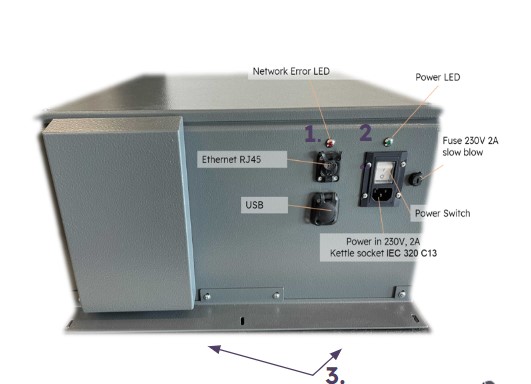
In some cases, an error may occur during setup. If you encounter any of the following situations, there are a few quick fixes:
1. If the red ‘Network Error’ light is ON:
- Check whether Ethernet cables are bent or split.
- Ensure you’ve whitelisted all the relevant ports.
- Make sure your on-site network connection is stable.
- Check that the power cable is working.
- Ensure that voltage and amps correspond.
- Restart the unit using the power button.
- Contact the Greyparrot IT team if flashing persists.