![Main.png]](https://knowledge-hub.greyparrot.ai/hs-fs/hubfs/Main.png?height=40&name=Main.png)
Your dashboard will automatically start displaying updated material types as we add them, but if you want to see that new detail in your Analyzer portal, you’ll need to reconfigure your scenario(s). We’ve created a quick guide below.
Don’t worry about reconfiguration erasing past insights — historical data will still be presented with the material types you used at the time.
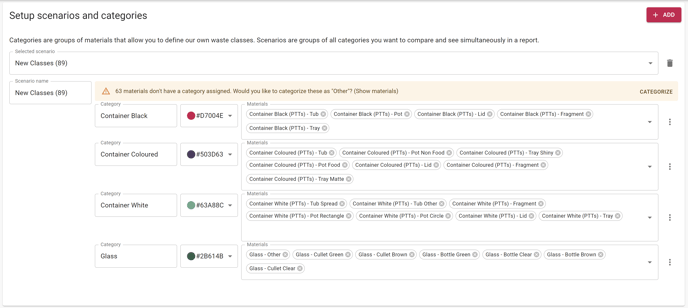
How to add new waste classes to your scenarios and categories
Here’s how to make use of newly-added material types by creating scenarios with more detailed categories:
- Head to your scenario’s ‘Setup’ page
- Choose an existing scenario, or create a new one
- Add new material classes to the 'Materials' field
Your changes will be saved automatically, so your scenario settings will update as soon as you add new material classes.
An example use-case for more detailed scenarios:
Before expanding our ‘Container’ material category, (learn more here) the scenario below grouped all relevant containers into just one material type (‘Container White’).
Before expansion:

The addition of six more detailed white container classes made it possible to group relevant materials into one ‘Container White’ category, then assign them to a new ‘Container White Tubs’ category, or a ‘Container White Other’ category.
After expansion:

☎️ We’re here to help! Book a call with our customer success team, and we’ll configure your settings together 👉 Get in touch