![Main.png]](https://knowledge-hub.greyparrot.ai/hs-fs/hubfs/Main.png?height=40&name=Main.png)
In addition to SMS and email alerts, the Analyzer portal also offers the ability to visually monitor alerts in real time. For information on setting up alerts, click here. Once you have an alert configured, follow these steps to add it to the Alerts dashboard.
Start by navigating to the “Alerts dashboard” in the Analyzer portal. From here:
- Click “Add”
- Select the alert you wish to visualise
- Click “Confirm”
Once added, you’ll see your alert chart on the dashboard.
The alert chart broken down
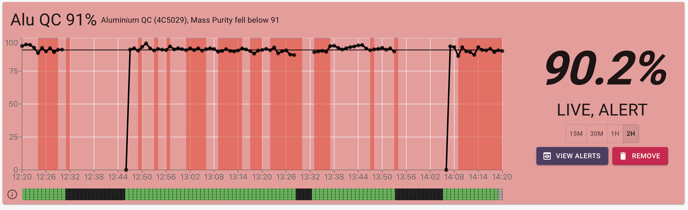
- Alert name
- Alert application
- Alert configuration
- Current value
- Current state
- Chart period options
- Detailed view of alerts button
- Remove button
- Performance line
- Alert value line
- Belt status bar
- Alert period (red bars not shown in image, need new image)
- Period below threshold
- Period belt running empty
The alert chart will update every minute with the average for the previous minute.