![Main.png]](https://knowledge-hub.greyparrot.ai/hs-fs/hubfs/Main.png?height=40&name=Main.png)
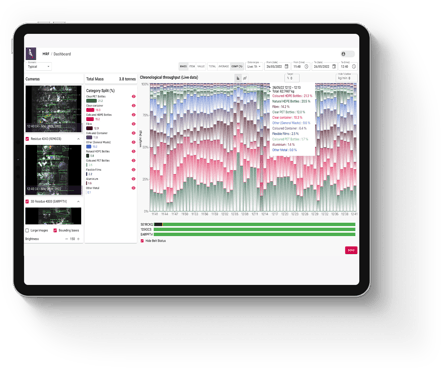
How often do you update the dashboard?
We’re constantly adding new features and functional improvements to the dashboard. Customers get access to these updates with every new release, at no extra cost. More significant features are added several times a year.
Can the dashboard export CSV/XML files?
Yes, you can generate and export CSV files directly from the dashboard. These reports are completely customisable, allowing you to filter by unit, material class, metrics, time frame, granularity and more.
You can also create automated report templates that are sent to selected users on a daily, weekly or monthly basis.
How do I access the dashboard?
The dashboard is a secure, dedicated home for your waste analytics on our cloud servers. You can access it through any web browser, on any device – it performs best on Chrome and Firefox, though!
Is the dashboard available in different languages?
At the moment, the dashboard is only available in English. That doesn’t mean non-English-speaking colleagues can’t use it!
Because we host the dashboard online, it’s possible to enable live translation features in browsers like Chrome. We can’t guarantee that every translation will be perfect, but we’ve tested a handful of them. They’re usually good enough for operational use.
Can you modify the dashboard based on customer requirements?
We’re always happy to get feedback and requests. Requests are incredibly valuable to us, because they help to define our dashboard development roadmap. We’re quick to iterate, too – if a modification will benefit all of our customers, we’ll prioritise it.
We won’t force you to use our dashboard, though! An open API makes it possible to integrate our AI directly into your system if you’d prefer to use your own software.
How granular is historical data? Can I revisit historical images of the belt?
The dashboard retains historical data down to a minute-by-minute level. Select a month, day, hour or minute, and a white window will appear. It'll show you the quantities or percentage (in mass, financial value or item count) for the selected time frame.
It'll also surface the photo our unit took for the selected unit of time, so you can add a visual element to your historical analysis.
Can I see a live image feed from my belts?
The dashboard’s camera module automatically updates when the unit is running and you are in “Live” mode (found under “Date Ranges”). If there is no image or the image is static, the belt has probably stopped.
My camera view seems to repeat the same image – does this mean the visible items have been counted multiple times?
An error in the camera feed doesn't indicate a recognition error, or the risk of duplicate data. The image you see on your dashboard is there to aid visualisation, but our recognition and composition analysis takes place elsewhere.
In simple terms, we capture the image, run the analysis in our cloud server, send the data to your dashboard and attach an image with recognition box overlays. Any errors at this final step won't impact the accuracy of your data.