![Main.png]](https://knowledge-hub.greyparrot.ai/hs-fs/hubfs/Main.png?height=40&name=Main.png)
Building the mounting frame
We’ll ship the monitoring unit to your facility with a trackable carrier.
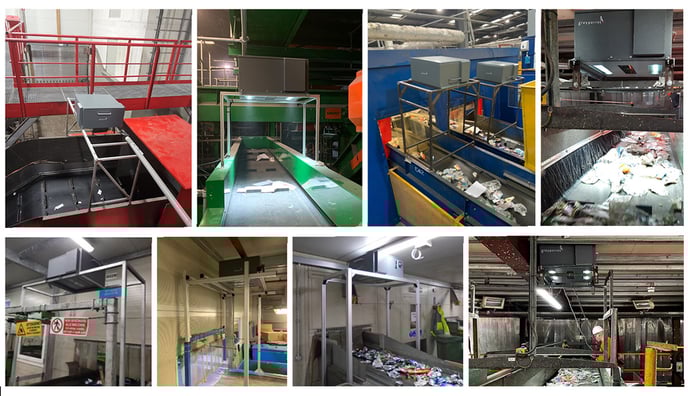
Once it arrives, you’ll need to install the unit on top of the conveyor belt using a mounting frame. These are typically built using aluminium profiles attached to the sides of your conveyor belt, or the floor.
Make sure to follow our installation guidelines when building and attaching the frame. It’ll ensure that the distance between your conveyor belt and our camera is correct, amongst other requirements.
💡 Click here for installation tips and examples
Installing the monitoring unit
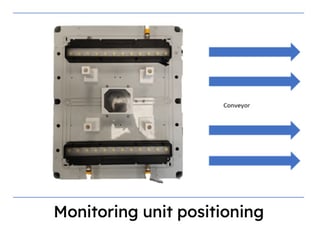
With the frame in place, you’re ready to install the monitoring unit. It’s designed to sit on top of the frame with its lights parallel to the conveyor belt (see below).
Once the unit has been attached to the frame, it needs continuous power. Connect it to a 230V power socket with the power cable provided. You'll find our detailed power requirements in the installation guide, which is linked above.
💡 For reference, the average heat dissipation is 100W
Connecting to the Ethernet
Get the monitoring unit online by connecting it to the local Ethernet with the RJ45 socket.
Turn it on using the power switch, and the monitoring unit will establish a connection to the Greyparrot Cloud Service.
💡 If it’s having trouble connecting, the red Network Error LED will turn on.
Check the network connection, and ensure that the ports 8080,443, 1194 and all IP addresses are permitted.
Once the monitoring unit is up and running (the green Power LED is on, and the red Network LED is off) a member of the Greyparrot team will be notified, and we’ll configure it remotely for you.
Installation and configuration of the unit should only take a few hours, and it doesn’t require any special equipment like heavy-lifting machinery. You’ll just need hand tools and an Ethernet connection!