![Main.png]](https://knowledge-hub.greyparrot.ai/hs-fs/hubfs/Main.png?height=40&name=Main.png)
What's in the box?
There’s more to our monitoring unit than meets the eye. The aluminium housing contains:
- A high-resolution RGB camera with a zoom lens;
- High-frequency LED lights;
- A processing unit and hard drive;
- Components and cables to connect all of the above.
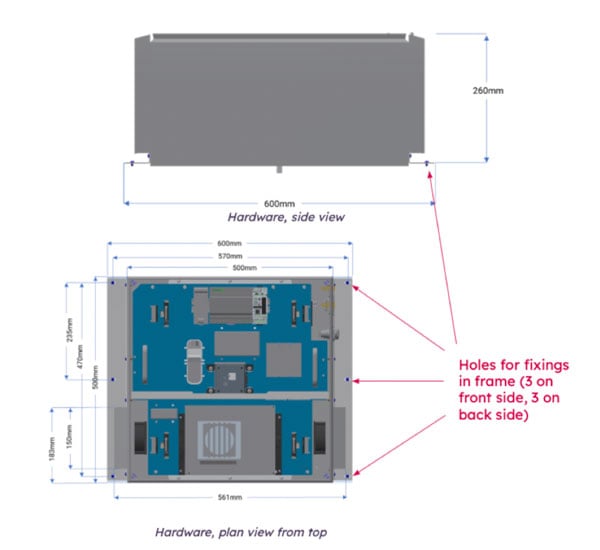
We fit all of that into a 60cm x 50cm x 26cm box that weighs about 24.5 kg.
What's on the box?
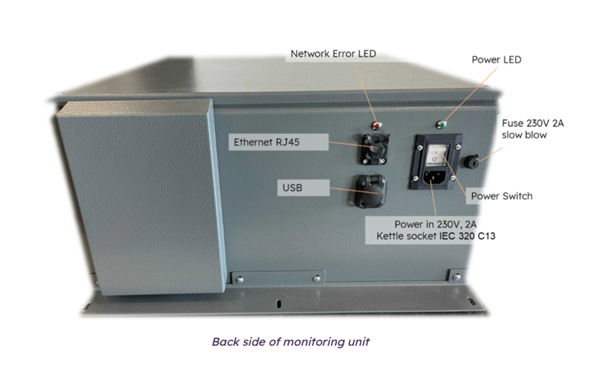
You’ve probably noticed a few switches and sockets on the outside of your unit. Here’s what you can access externally:
- A 110-220V power socket;
- The on/off power switch;
- An RJ45 Ethernet socket;
- A Network Error LED (to make sure your box is online);
- A USB-A port.
Installation requirements
|
Conveyor belt speed |
Typical 0.5 m/s; max 3m/s |
|
Conveyor belt width |
Standard: Typical 600mm; max 1200mm; Accelerator belts: up to 4000mm (2-3 units) |
|
Power supply requirement |
110-240V,3A max, <2A typ. |
|
Socket |
110-240V, 13A max |
Connectivity requirements
Since the monitoring unit uploads an image stream to the cloud, you’ll need a strong internet connection with plenty of bandwidth. Our unit connects to the internet via an Ethernet cable – without needing a local VPN.
For reference, the average camera unit typically requires a speed of 1MBps.
Access requirements
You’ll need to open the following ports so our unit can communicate with AWS:
- 8080
- 443
- 1194
Since AWS uses alternating IP addresses, there shouldn’t be any proxies or gateways in the way. In case you want to whitelist the URLs, we use:
- greyparrot-all-data.s3.eu-west-2.amazonaws.com
- greyparrot-jetson-files.s3.eu-west-2.amazonaws.com
- greyparrot-all-data.s3.amazonaws.com
- greyparrot-jetson-file.s3.amazonaws.com
If s3 domains clash with your firewall, the following list of IPs can be whitelisted for s3. It’s worth noting that these IPs are subject to change as AWS continues to modify its resources. That’s why domains are the preferred path.
52.95.142.0/24
52.95.143.0/24
52.95.144.0/24
52.95.145.0/24
52.95.146.0/24
52.95.147.0/24
52.95.148.0/24
52.95.149.0/24
52.95.150.0/24
52.95.150.0/24
52.95.150.0/24
52.95.150.0/24
- greyparrot-live-dashboard.s3.eu-west-2.amazonaws.com
- <clientname>.live.greyparrot.ai
- <clientname>.dashboard-dev.greyparrot.ai,
- vpn-api.greyparrot.ai,
- live.greyparrot.ai
Safety at installation
Mounting:
- The monitoring unit weighs approx. 25kg endangering muscles, joints and bones of the people handling it. Please consider manual handling training and safety rules when lifting the unit to prevent any injuries.
- For lifting and mounting, two people or mechanical lifting equipment is required. Please consider working at height safety rules where relevant.
- Before installing the hardware, bring it close to the frame, in several steps if necessary, to reduce the distance covered while lifting the hardware.
- PPE including safety shoes and gloves are recommended to be worn to prevent any slips or cuts. All site rules, requirements and guidelines should be followed at any time (please check with the site manager).
- If you are using any tools, please make sure you have the relevant training and certification and are following any safety guidelines.
- Whenever carrying out the works, follow the risk assessment and method statement imposed by your company and site supervisor. Greyparrot can provide a standard risk assessment and method statement as a guide, however your company’s own safety rules and documentation must be in place and prevail.
Operating:
- Only people who have experience and training with mounting equipment (when used) and high loads, are allowed to perform maintenance or adjust the monitoring unit
- Only authorized personnel who are trained, certified and/or have the according electrical knowledge, are allowed to work on electrical devices. Do not operate the monitoring box without the lid sealed closed.
- Handling is allowed for authorized personnel only, please ensure that unauthorized personnel does not have access to the monitoring unit.
- The safety regulations and regulatory notes of included parts have to be considered. We explicitly refer to the safety regulations of the illumination ODL 300, SmartVisionLights that is included in this documentation (photosensitivity)
- All documentation of the camera box needs to be accessible to the operating personnel at all times.
Safety at usage
Photosensitivity / epileptic seizures:
A very small percentage of individuals may experience epileptic seizures when exposed to flashing lights. Our illumination strobes with frequencies above 100Hz which should not be visible for the human eye. Exposure to strobing lights may induce an epileptic seizure in these individuals. Certain conditions may induce previously undetected epileptic symptoms even in persons who have no history of prior seizures or epilepsy. Individuals who have an epileptic condition must consult their physician prior working close to our illumination. If these individuals experience any of the following symptoms being close to our illumination -- dizziness, altered vision, eye or muscle twitches, loss of awareness, disorientation, any involuntary movement, or convulsions – they must IMMEDIATELY discontinue use and consult their physician. Greyparrot will be happy to assist you in finding the best solution to limit exposure to the illumination if needed.
Safety and regulatory compliance
Greyparrot’s devices are certified according to BS EN ISO 12100 to ensure machine safety which also concludes an EMV certificate.
In compliance with regulations, the monitoring unit is supposed to be mounted on top of conveyor belts in indoor recycling facilities.
The unit can cope with a temperature range of 0°C to 40°C and a humidity of 20% at 20°C resp. 80% at 26°C.
The regulations arise from the Declaration of Conformity and have to be considered as a requirement for operating and maintaining the unit.

Troubleshooting
Once the monitoring unit is up and running (the green Power LED is on, and the red Network LED is off) a member of the Greyparrot team will be notified, and we’ll configure it remotely for you.
In some cases, an error may occur during setup. If you encounter any of the following situations, there are a few quick fixes:
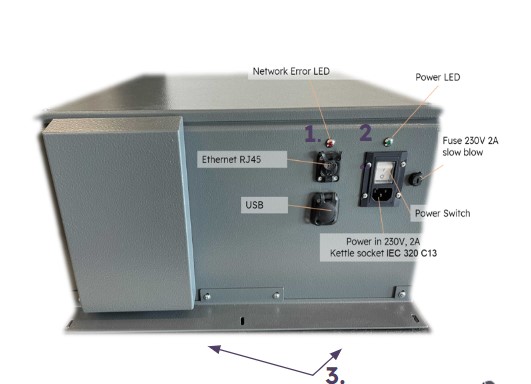 1. If the red ‘Network Error’ light is ON:
- Check whether Ethernet cables are bent or split.
- Ensure you’ve whitelisted all the relevant ports.
- Make sure your on-site network connection is stable.
2. If the green power light is OFF:
- Check that the power cable is working.
- Ensure that voltage and amps correspond.
3. If the camera’s white LED lights are flashing/flickering:
- Restart the unit using the power button.
- Contact the Greyparrot IT team if flashing persists.